Your bar's records,
cued by the room.손님이 직접 큐하는
우리 가게의 레코드.
Guests scan a QR code on the table, browse tonight's crate on their phone, and cue a record. Every cue lands in your booth app — you decide what hits the platter. No app for guests, no accounts, nothing to install. 손님이 테이블의 QR을 찍으면 폰에서 오늘 밤의 크레이트를 구경하고 레코드를 큐할 수 있어요. 모든 큐는 부스 앱으로 도착하고, 트는 건 사장님이 결정합니다. 손님은 앱 설치도 가입도 필요 없어요.
Stock your crate — scan barcodes, search Apple Music, or shoot a shelf photo.크레이트 채우기 — 바코드 스캔, Apple Music 검색, 선반 사진 촬영으로.
Print the QR card and put it on the tables.QR 카드를 인쇄해 테이블에 올려두기.
Guests cue. You play. The night runs itself.손님이 큐하고, 사장님이 틉니다. 밤이 알아서 굴러가요.
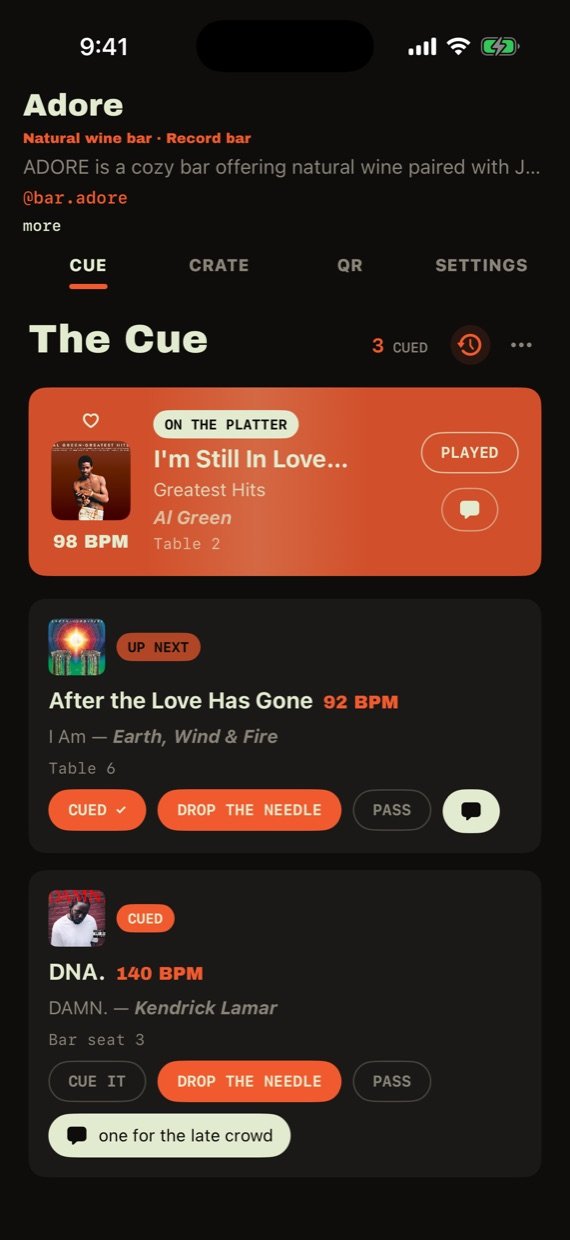
Every request, one queue모든 신청이 한 줄로
Cues land here in real time, newest at the top, with the guest's table number and note.큐가 실시간으로 도착합니다 — 테이블 번호와 메모까지 함께.
- CUE IT tells the guest "up next".CUE IT — 손님에게 "다음 곡"이라고 알려줘요.
- DROP THE NEEDLE marks it playing — the guest's phone lights up.DROP THE NEEDLE — 재생 표시, 손님 폰에 바로 반영됩니다.
- PASS politely declines. The 💬 bubble sends a quick reply ("side B if you have it").PASS — 정중한 거절. 💬 버튼으로 짧은 답장도 보낼 수 있어요.
- Guests can ♥ the playing track — hearts float up on the NOW PLAYING card.손님이 재생 중인 곡에 ♥를 누르면 NOW PLAYING 카드에 하트가 떠올라요.
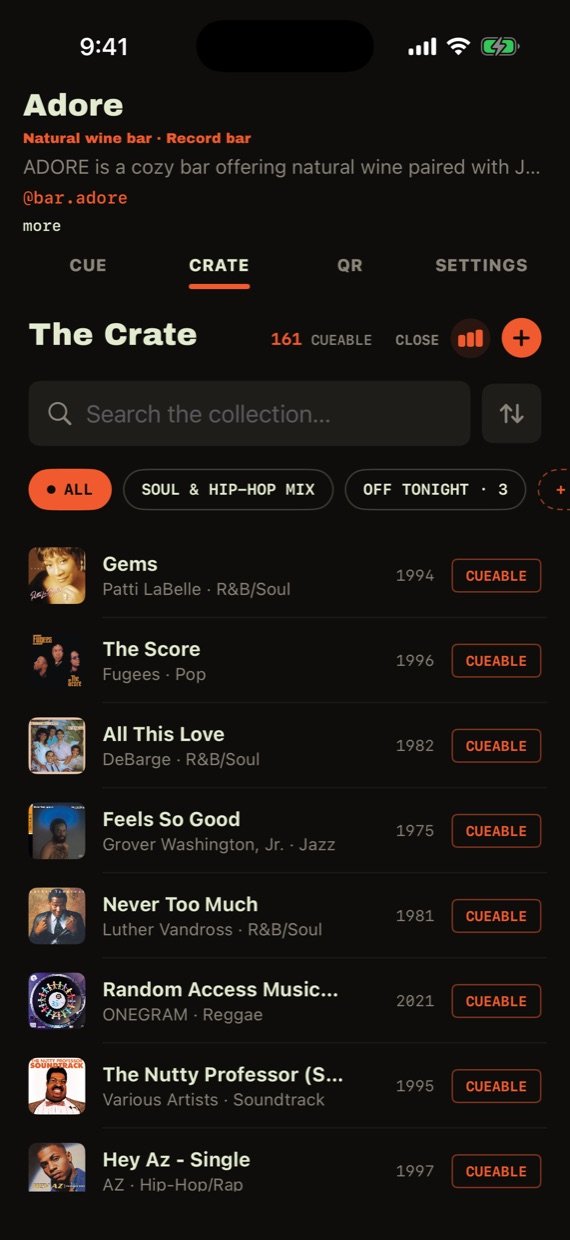
Your collection, digitized in a night하룻밤이면 끝나는 컬렉션 등록
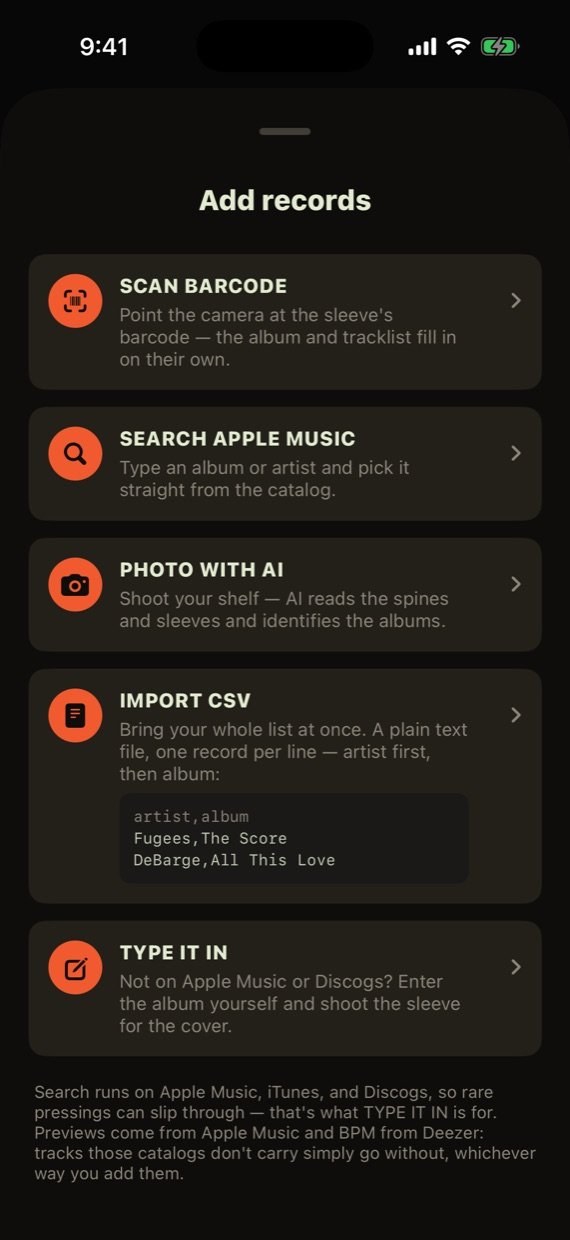
Five ways in, zero typing:타이핑 없이 다섯 가지 방법으로:
- Scan a record's barcode.레코드 바코드 스캔.
- Search Apple Music.Apple Music 검색.
- Photo with AI — shoot a whole shelf, it identifies the sleeves.AI 사진 — 선반째 찍으면 커버를 알아서 인식해요.
- CSV import for an existing list, or type one in by hand.기존 목록은 CSV로 가져오기, 또는 직접 입력.
- Toggle any record CUEABLE / OFF TONIGHT, or build sets ("Soul Night") and open only one set to guests.레코드마다 CUEABLE / OFF TONIGHT 전환, "Soul Night" 같은 세트를 만들어 그 세트만 열 수도 있어요.
Tap + to pick how you want to add. Tracklists and 30-second previews come along automatically, and Kissa fills in BPM for each track where it can.+를 누르면 추가 방법을 고를 수 있어요. 트랙리스트와 30초 미리듣기는 자동으로 붙고, 트랙별 BPM도 가능한 만큼 채워줍니다.
Bring your whole list at once목록을 한 번에 가져오기
Already keep your collection in a spreadsheet (Excel, Numbers, Google Sheets, Discogs export)? Save it as a CSV with two columns — artist,album — and Kissa matches every row on Apple Music: covers, tracklists and previews come along automatically.엑셀·Numbers·구글 시트·Discogs 내보내기 등으로 컬렉션 목록이 이미 있다면, artist,album 두 열짜리 CSV로 저장하세요. Kissa가 줄마다 Apple Music에서 찾아 커버·트랙리스트·미리듣기까지 자동으로 붙여줍니다.
artist,album
Marvin Gaye,What's Going On
Stevie Wonder,Innervisions
John Coltrane,Blue Train
- In the Crate, tap + → Import CSV.크레이트에서 + → Import CSV.
- Pick your CSV file (a header row is fine — it's skipped).CSV 파일 선택 (첫 줄 제목행은 있어도 됩니다 — 자동으로 건너뜀).
- Watch the rows resolve, uncheck anything you don't want, tap ADD.줄마다 매칭되는 걸 확인하고, 뺄 것은 체크 해제 후 ADD.
Tip: open the sample in any spreadsheet app, replace the rows with your records, export as CSV — done.팁: 예시 파일을 스프레드시트 앱에서 열어 내용만 내 레코드로 바꾸고 CSV로 내보내면 끝.
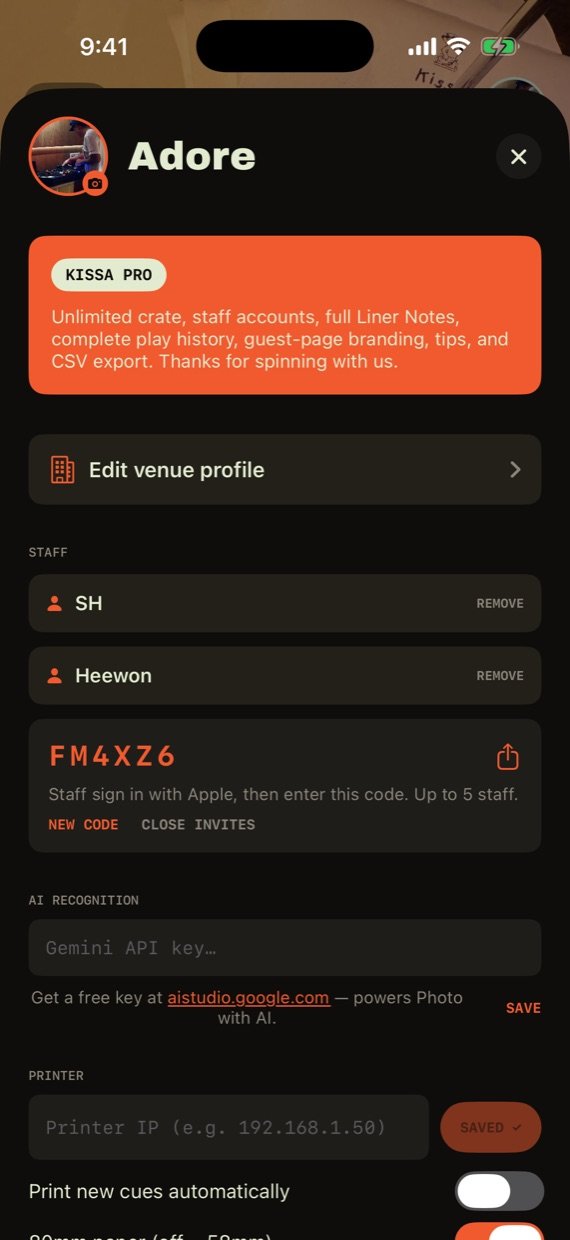
Your free Google AI key무료 Google AI 키 설정
Photo with AI (shoot a whole shelf and Kissa names every sleeve) and tracklist reading (shoot a back sleeve) run on Google's Gemini. You bring your own free key — it takes about a minute:AI 사진 추가(선반째 찍으면 커버를 전부 인식)와 트랙리스트 읽기(뒷면 촬영)는 Google Gemini로 동작합니다. 무료 키 하나만 발급받으면 되고, 1분이면 끝나요:
- Open aistudio.google.com/apikey and sign in with any Google account. (Kissa's key screens link straight there.)aistudio.google.com/apikey에 접속해 구글 계정으로 로그인. (Kissa의 키 입력 화면에서 바로 열리는 링크도 있어요.)
- Tap Create API key → the key appears (a long string starting with
AIza…) → Copy.Create API key를 누르면AIza…로 시작하는 긴 문자열이 생깁니다 → 복사. - In Kissa: tap your avatar (top right of the cover) → AI RECOGNITION → paste the key → SAVE.Kissa에서: 커버 오른쪽 위 아바타 → AI RECOGNITION → 키 붙여넣기 → SAVE.
- Now try Crate → + → Photo with AI on a shelf of records.이제 크레이트 → + → Photo with AI로 선반을 찍어보세요.
Free & private: the free tier is plenty for a bar's crate and needs no credit card. The key is stored only on your phone (keychain) — it never touches Kissa's servers.무료·안전: 무료 쿼터로 가게 크레이트 등록에는 충분하고 카드 등록도 필요 없습니다. 키는 이 폰(키체인)에만 저장되고 Kissa 서버로는 전송되지 않아요.
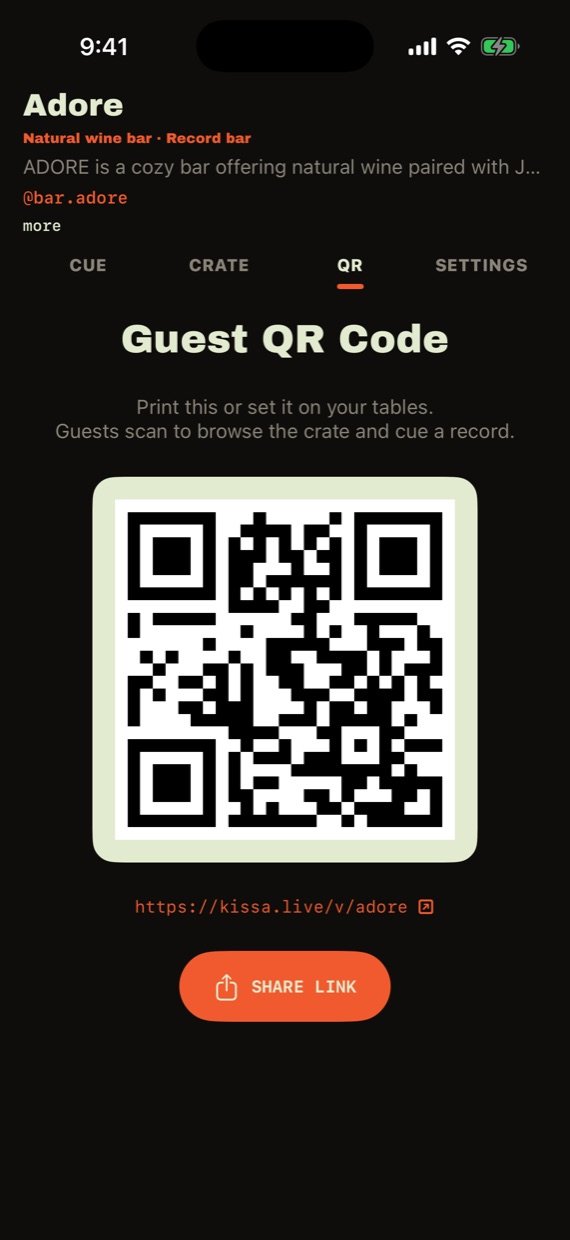
One QR. No app to download.QR 하나면 끝. 앱 설치 없음.
Every booth gets its own page at kissa.live/v/your-bar and a print-ready QR card for the tables. Share the link anywhere — Instagram bio, menus, table tents.부스마다 kissa.live/v/가게이름 전용 페이지와 인쇄용 QR 카드가 생겨요. 링크는 인스타 프로필, 메뉴판 어디든 붙일 수 있습니다.
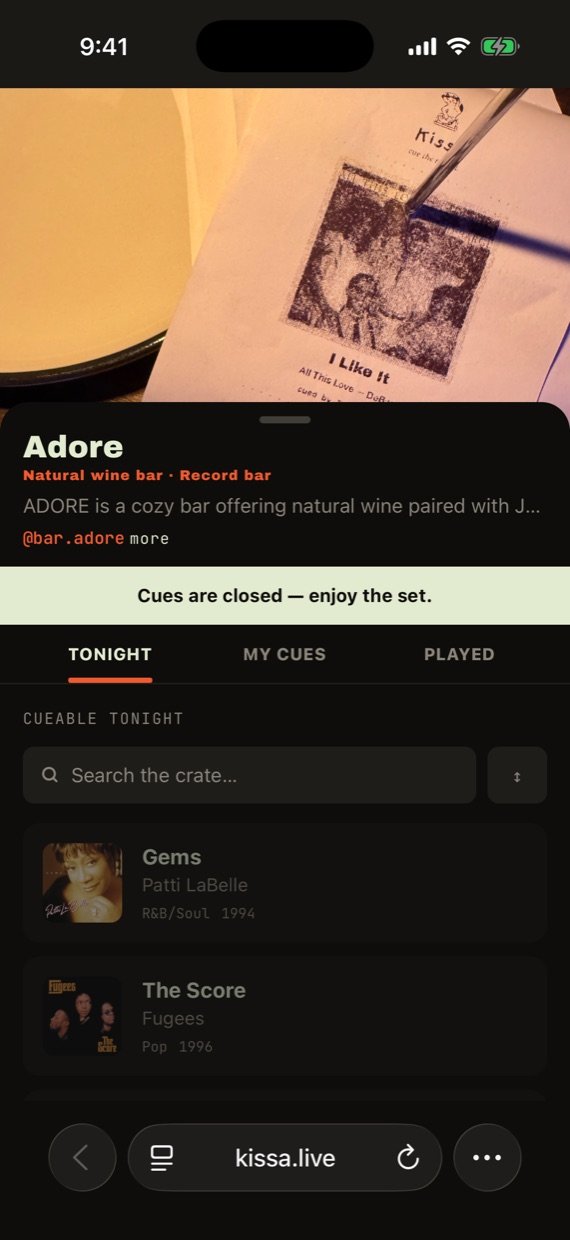
This is what guests see: tonight's crate with covers and previews, a slide-to-cue control, live status for their cues ("Cued → Up next → On the platter"), and share cards for their story. If you enable tips, tip buttons appear right after they cue.손님 화면은 이렇습니다: 커버·미리듣기가 있는 오늘 밤의 크레이트, 밀어서 큐하기, 내 큐의 실시간 상태(큐됨 → 다음 곡 → 재생 중), 스토리용 공유 카드까지. 팁을 켜두면 큐 직후 팁 버튼도 떠요.
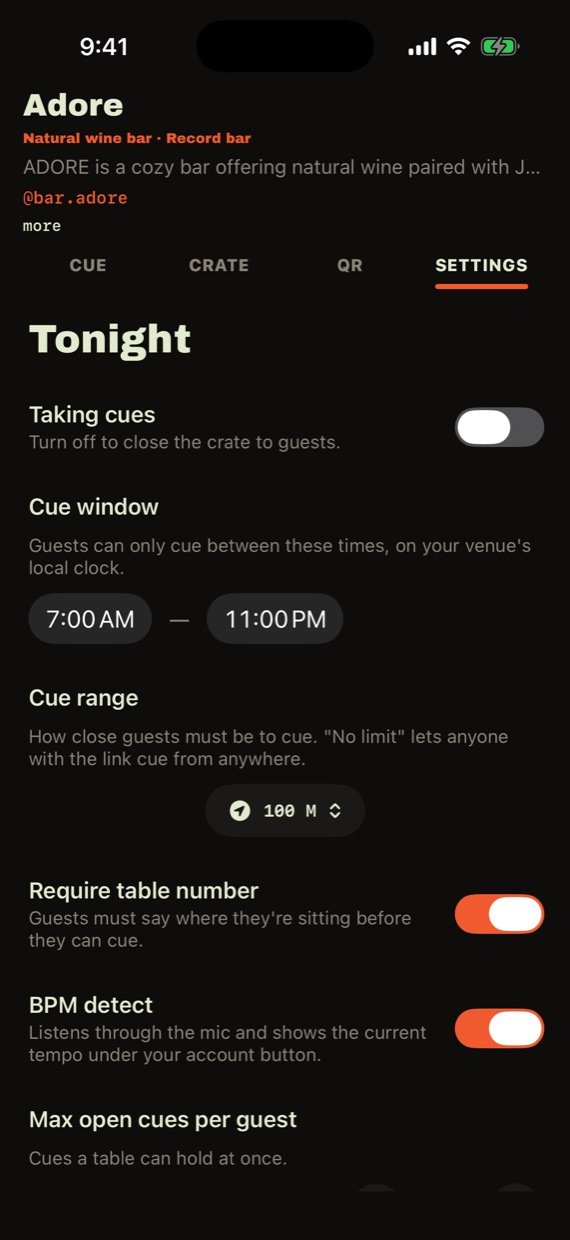
House rules, per night그날그날의 하우스 룰
- Taking cues — the master switch. Off = crate closed.Taking cues — 마스터 스위치. 끄면 크레이트가 닫혀요.
- Cue window — requests only between these hours.Cue window — 이 시간대에만 신청을 받아요.
- Cue range — guests must be within X meters (so nobody cues from home).Cue range — 가게에서 X미터 안에 있어야 큐 가능 (집에서 큐하는 것 방지).
- Require table number — so you know where a cue came from. DJ booths ask for a name instead.테이블 번호 필수 — 어느 테이블의 큐인지 알 수 있게. DJ 부스는 대신 이름을 받아요.
- BPM detect — the mic reads the room's tempo, live on the cover photo.BPM 감지 — 마이크가 현재 곡의 템포를 읽어 커버 위에 보여줍니다.
Cue tickets, kitchen style주방 주문서처럼 나오는 큐 티켓
On Pro, every new cue can roll off a receipt printer — track, album, table, note — like a kitchen ticket. Works with standard ESC/POS network receipt printers (Epson TM series and most 80mm/58mm printers).Pro에서는 새 큐가 들어올 때마다 영수증 프린터로 티켓이 출력됩니다 — 곡·앨범·테이블·메모까지, 주방 주문서처럼요. 표준 ESC/POS 네트워크 영수증 프린터(Epson TM 시리즈 등 80mm/58mm 대부분)와 호환됩니다.
- Connect the printer to your venue's network (Ethernet or Wi-Fi) and find its IP address — on most printers, hold the FEED button while powering on to print a self-test slip that lists it.프린터를 가게 네트워크(이더넷/와이파이)에 연결하고 IP 주소를 확인하세요 — 대부분 전원을 켤 때 FEED 버튼을 누르고 있으면 IP가 적힌 셀프테스트 용지가 나옵니다.
- Put your iPhone on the same Wi-Fi network as the printer. (POS printers often live on their own router — join that one.)아이폰을 프린터와 같은 와이파이에 연결하세요. (POS 프린터가 전용 공유기에 물려 있는 경우가 많으니 그 와이파이로.)
- In Kissa: avatar → PRINTER → type the IP → SAVE → TEST PRINT.Kissa에서: 아바타 → PRINTER → IP 입력 → SAVE → TEST PRINT.
- Turn on Print new cues automatically — from now on every cue prints itself. Using narrow paper? Flip the 58mm switch.Print new cues automatically를 켜면 이후 모든 큐가 자동 출력됩니다. 좁은 용지를 쓰면 58mm 스위치를 켜세요.
Good to know: auto-print works while the Kissa app is open on your phone. If the printer is also your POS printer, cue tickets will interleave with orders — many bars like that; if not, a dedicated $80-ish ESC/POS printer does the job.참고: 자동 출력은 Kissa 앱이 열려 있는 동안 동작합니다. POS 주문서 프린터를 같이 쓰면 주문서 사이에 큐 티켓이 섞여 나와요 — 주방 티켓처럼 쓰기엔 오히려 좋고, 싫다면 8만원대 ESC/POS 프린터를 하나 두면 됩니다.
Liner Notes & history라이너 노트 & 히스토리
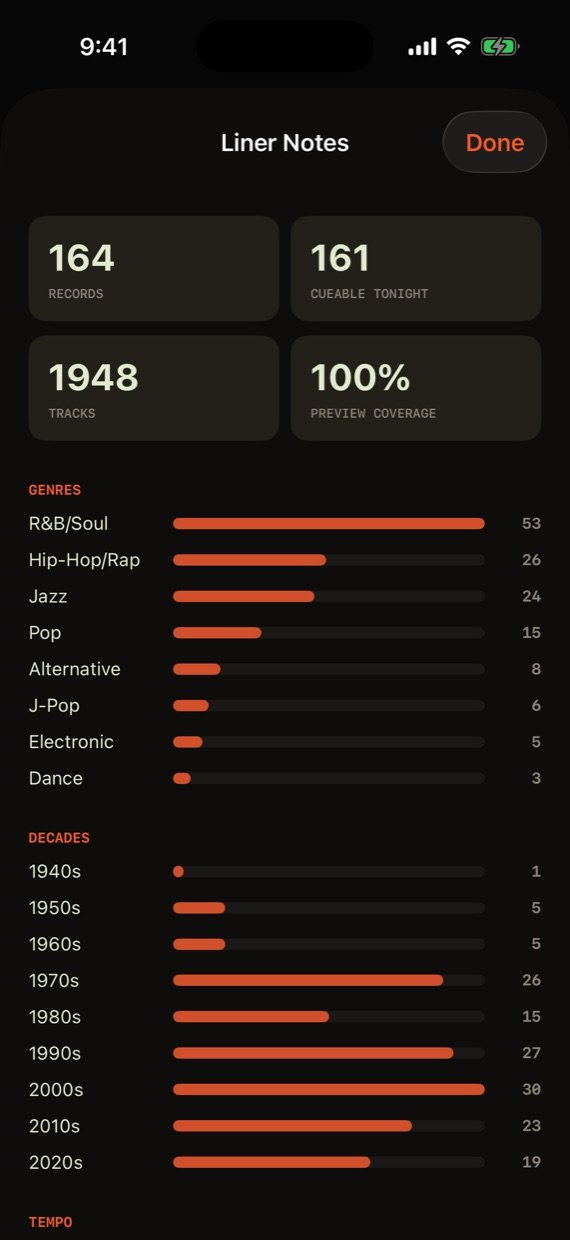
Liner Notes breaks your crate and your crowd down: genres, decades, tempo range, most-cued and most-loved records, plus how many guests were on the link tonight.Liner Notes는 크레이트와 손님을 숫자로 보여줍니다: 장르·연대·템포, 가장 많이 큐된/사랑받은 레코드, 오늘 밤 접속한 손님 수까지.
Play history keeps every night on the record — what played, when, for which table.플레이 히스토리에는 매일 밤의 기록이 남아요 — 무엇을, 언제, 어느 테이블을 위해 틀었는지.
Start free, grow into Pro무료로 시작, 필요할 때 Pro
| FREE | PRO | |
|---|---|---|
| Crate크레이트 | 50 records50장 | Unlimited무제한 |
| Apple Music playlist importsApple Music 플레이리스트 임포트 | 1 playlist1개 | Unlimited무제한 |
| Live cue queue + guest page + QR실시간 큐 + 게스트 페이지 + QR | ✓ | ✓ |
| Staff accounts (up to 5)스태프 계정 (5명까지) | — | ✓ |
| Tip links on the guest page게스트 페이지 팁 버튼 | — | ✓ |
| Cue tickets on your receipt printer영수증 프린터로 큐 티켓 출력 | — | ✓ |
| Full play history, Liner Notes & guest stats전체 히스토리 & 라이너 노트 & 접속자 통계 | — | ✓ |